
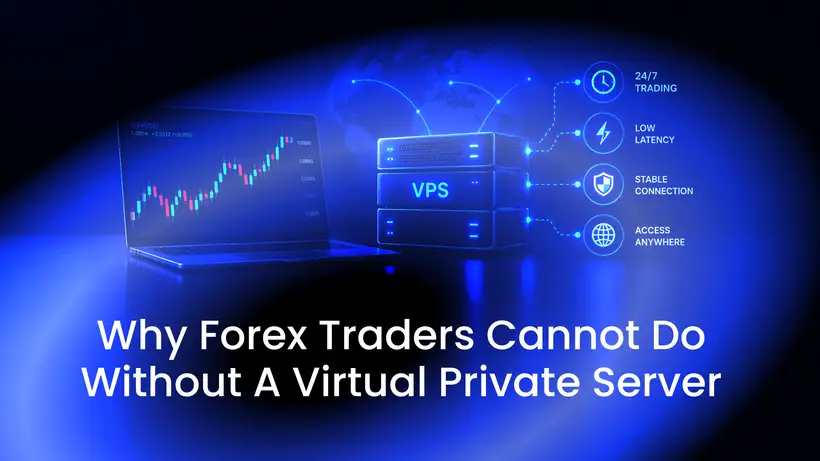
A virtual private server (VPS) is a virtual computer that runs in a data center. You rent it, connect to it over the internet and use it like your own machine. For forex traders, its main job is simple: it keeps your trading platform and your Expert Advisors running around the clock, whether your own computer is on or off.
Not every trader needs one. If you trade by hand, and only while you sit at your computer, your own PC does the job. But if you run automated strategies or want your platform online while you are away, a VPS is hard to do without. This guide explains why, what a VPS does and doesn't do for the speed of your orders, and what to check before you choose one.
What a VPS for forex trading is
A VPS is not a program you download. It is a virtual machine on a physical server in a data center, with its own operating system, storage and IP address. One physical server is split into several virtual machines, and each customer gets their own, with full control over it.
For trading, the VPS usually runs Windows Server, because desktop trading platforms such as MetaTrader 4 and MetaTrader 5 are built for Windows. You connect with Remote Desktop, install your platform and log in to your broker. When you close the Remote Desktop window, the platform keeps running on the server. A VPS used this way is often called a forex VPS.
Why forex traders use a VPS
Expert Advisors that keep running
An Expert Advisor (EA) is a program that trades for you in MetaTrader, following the rules it was written with. It works only while the platform is running and connected to your broker's trade server. If you turn off your computer, close the platform or lose your internet connection, the EA stops.
Trailing stops in MetaTrader also run in the platform, not on the broker's server. When the platform is off, a trailing stop stops moving, and only the stop loss it last set stays in place. Stop loss and take profit orders themselves are held on the broker's server.
Currency markets trade around the clock on weekdays, so an EA on a home computer misses whatever happens while that computer is off, asleep or restarting. On a VPS, it keeps working while you are at work, asleep or traveling.
Less dependence on your home setup
A power cut, a dropped Wi-Fi connection, a laptop that goes to sleep or an update that restarts your PC can each stop a platform at home. Data centers are built with backup power and several network connections, so a server there keeps running through the things that interrupt a home computer.
Access from anywhere
You can check your platform from any computer, tablet or phone with a Remote Desktop app. The platform and your EAs stay on the VPS, so you see the same setup wherever you connect from.
Does a VPS make your orders faster?
Only by shortening the trip to your broker. An order travels over the internet from the computer running the platform to your broker's trade server. The time that takes, called latency and shown as ping, depends mostly on the distance between the two and the network route in between.
A VPS close to your broker's trade server can reach it faster than a home computer far away, and a VPS far from it can be slower than your home connection. The speed comes from where the server is, not from it being a VPS.
A VPS doesn't change what happens at your broker: how fast it executes orders, its spreads and the prices you get are up to the broker. Your own internet connection doesn't slow an Expert Advisor's orders: they go straight from the VPS to the broker. When you trade by hand over Remote Desktop, your click travels to the VPS first, so for manual orders your own connection still counts.
How to check the ping before you order
- Ask your broker for the address of its trade server: a host name or an IP address.
- Run a ping or traceroute to that address from the provider's looking glass, a web page that runs network tests from the provider's own network. Ours is on our data center page.
- After setup, check the ping in your platform.
What to check before you choose a VPS for trading
- The network: test the ping to your broker's trade server before you pay, and check whether you can cancel for a refund if the result after setup isn't what you need.
- Windows version and license: check your platform's system requirements, choose a Windows Server version it supports, and check whether the Windows license is included in the price.
- Memory and processor: each terminal and EA uses memory and processor time, so the more you run, the more RAM you need. Check that you can move to a bigger plan later. On many VPS plans, CPU and RAM are shared with other virtual machines on the same host; for long backtests and optimizations, which keep the processor busy for hours, look for CPU and RAM reserved for you.
- Control and support: full administrator access, a control panel to reboot or reinstall the VPS if Windows stops responding, and support that replies quickly.
- Who installs the platform: many providers supply the server only, and you install and manage your trading platform yourself.
Keeping your platform running
- Disconnect, don't sign out. Closing the Remote Desktop window only disconnects you, and your programs keep running. Signing out of Windows closes them.
- Plan your restarts. A restart, for example after Windows updates, closes your platform too. Install updates regularly, but choose when they restart the server, for example at the weekend, when your markets are closed.
- Check after every restart. Connect again, start your platform, and check that each Expert Advisor is attached to its chart and that automated trading is switched on with the AutoTrading or Algo Trading button, depending on your MetaTrader version.
Security basics for a trading VPS
Your VPS holds the login to your trading account, so protect it as you would the account itself:
- Give every account that can connect with Remote Desktop a strong, unique password, and change the password you first received.
- Make sure Network Level Authentication is switched on for Remote Desktop. Microsoft recommends it: users have to sign in before a remote session starts.
- If you always connect from the same fixed IP address, allow Remote Desktop only from that address in Windows Defender Firewall.
- Install your platform only from your broker or its developer, and EAs only from sources you trust: a program on the server can read everything on it.
- Keep copies of your EA files and settings on another computer, so you can set up the VPS again if you need to.
Forex VPS at LyraHosting
Our forex VPS plans are Windows Server VPS on KVM in our data centers in the Netherlands:
- Windows Server 2016, 2019, 2022 or 2025, with the license included in the price;
- SSD storage, unlimited traffic, a dedicated IPv4 address and standard anti-DDoS protection;
- from €15.99 a month for 2 vCPU and 2 GB RAM, up to 32 vCPU and 32 GB RAM, with upgrades to a larger plan that take a quick reboot and keep your data and IP;
- set up automatically as soon as your order is processed, with the login details sent by email;
- a control panel to power the VPS on and off, reboot it, reinstall Windows or boot the rescue system;
- technical support by ticket 24/7/365, with a first reply within 1 hour.
CPU and RAM are shared on the host server, which keeps prices low. If you need CPU cores and RAM reserved for you alone, choose a hybrid server. The same plans also run other Windows software as an offshore Windows VPS.
We provide the server, not trading software or advice: you install MetaTrader or another platform from your broker or its developer and manage it yourself. Before you order, ping your broker's trade server from the looking glass on our data center page. Within 48 hours of your order you can cancel for a refund, except for crypto payments and payments for domains, control-panel licenses or account credit (Add Funds).
Trading carries risk. A VPS keeps your platform running; it doesn't make a strategy profitable.